
Every now and then it’s nice to build something purely for fun. No deadlines, no product goals, no “is this the right stack?” questions, just curiosity and nostalgia.
This little project started with a simple idea:
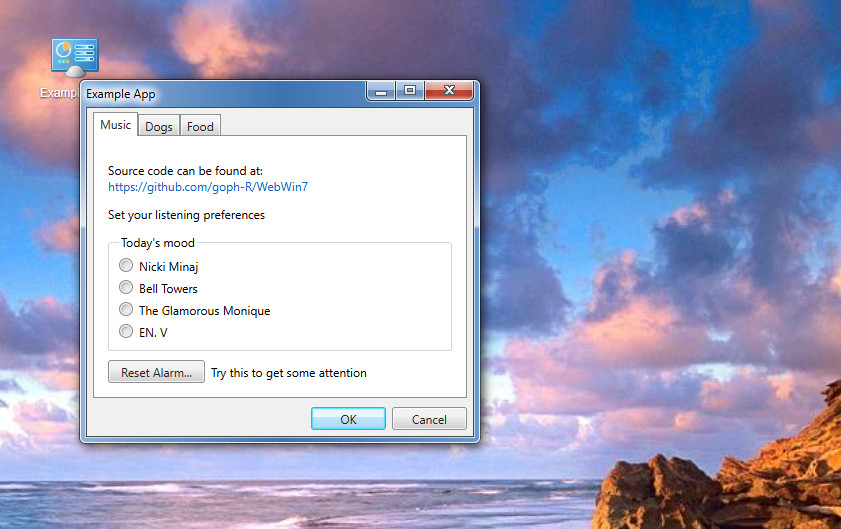
What if I recreated a Windows 7–style desktop experience directly in the browser?
Information: You can check the result at https://dynart.net/fun/win7.
No frameworks. No build tools. Just HTML, CSS, and JavaScript.
Why Windows 7?
Windows 7 sits in a sweet spot of UI history. It was polished, visually calm, and functional without being flashy. For many people (myself included), it’s peak “classic desktop UX”.
Recreating that look and feel isn’t about copying an OS, it’s about exploring how much of that experience can be reproduced with modern web primitives.
What I Built
The result is a small browser-based “desktop” with:
- A full-screen background
- A draggable, resizable window
- Minimize, maximize, and close behavior
- Tabbed content inside the window
- Responsive media (images and video resize correctly)
- A desktop icon with Windows-style selection
- Double-click to open the app, keyboard focus support
Everything runs in a single HTML file.
The visual styling comes from 7.css, which does a fantastic job of recreating Windows 7 UI components using only CSS. All behavior: dragging, resizing, window state is handwritten JavaScript.
The Fun (and Tricky) Parts
This project was full of small, interesting problems:
- Making dragging feel solid without “stuck mouse” bugs
- Handling resize edges and corners correctly
- Getting flexbox layouts to behave inside a resizable window
- Making embedded videos keep their aspect ratio while resizing
- Dealing with z-index and pointer-event edge cases
- Making “close” actually hide the window reliably
None of these are hard on their own but together they feel like building a tiny window manager.
That’s where most of the fun was.
Why No Framework?
Because it didn’t need one.
This project is a reminder that:
- The DOM is powerful
- Pointer Events are great
- Flexbox solves a lot of layout problems
- Vanilla JS is still perfectly capable for small UI systems
There’s something refreshing about opening a single file and seeing everything laid out plainly.
The Result
The end result isn’t meant to be production-ready software. It’s a playful, nostalgic experiment, a reminder of how desktop metaphors still translate surprisingly well to the web.
And honestly? It was just fun to build.
What’s Next? (Maybe)
If I ever extend it, possible ideas include:
- A taskbar with minimized windows
- Multiple windows with proper focus stacking
- Aero-style snap behavior
- A fake Explorer or Notepad app
- Optional Windows 7 sound effects
Or… it might just stay exactly as it is, a finished little toy.
Sometimes the best projects are the ones you build just because you can.
This was one of those.
