
What happens when you build a web game targeting browsers from 1997? No React, no CSS Grid, no fetch API just raw PHP, <table> layouts, and <font> tags. Welcome to Retro Dynart.
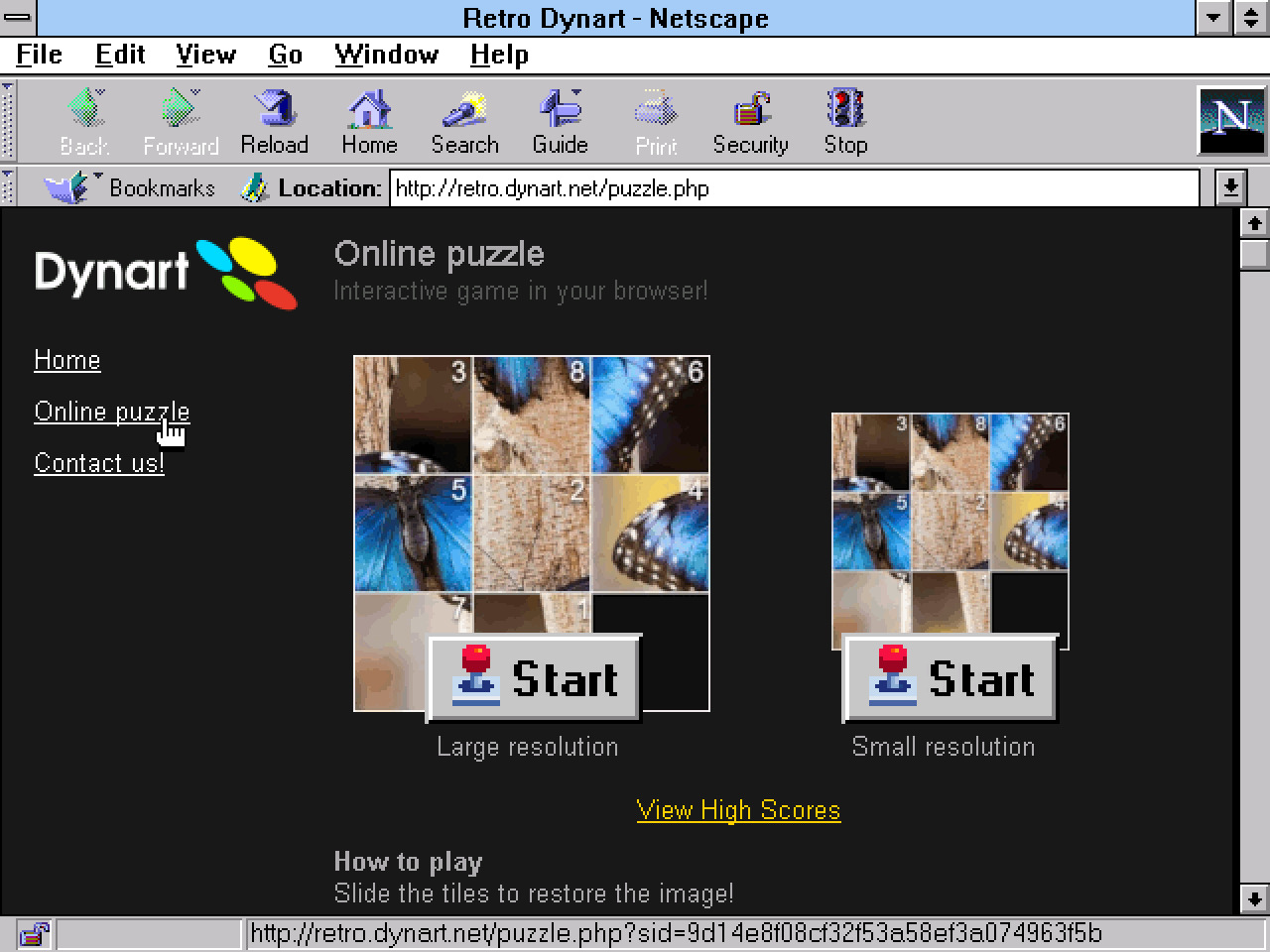
The source code can be found at: https://github.com/DynartInteractive/retro.dynart.net
The challenge
The rules were simple: build a fully functional sliding puzzle game that runs in Netscape Navigator 4.04 and Internet Explorer 3.0. No cheating with graceful degradation - it had to work natively in these ancient browsers as the primary target.
This meant giving up almost everything a modern web developer takes for granted:
No CSS files (all styling through HTML attributes like bgcolor and <font>)
No onclick event handlers on images
No document.images or new Image() in IE 3
No cookies (session IDs passed via URL parameters)
No JavaScript for game logic at all: every move is a full page reload
Pure PHP, Zero JavaScript
The entire game runs server-side. Click a tile, the browser requests a new page with ?move=5 in the URL, PHP updates the grid in the session, and sends back a fresh HTML page with the new board state. It sounds absurd by today’s standards, but it’s the only approach that works reliably across both target browsers.
The grid is a flat array in row-major order where 0 represents the empty space. The game supports proper 15-puzzle mechanics: clicking any tile in the same row or column as the empty space slides all tiles between them, not just adjacent ones.
Image Slicing with PHP GD
Each puzzle image gets dynamically sliced into tiles using PHP’s GD library. The generateSlice() function takes a source image and carves out individual pieces, optionally overlaying tile numbers with a blurred text shadow effect (4-pass Gaussian blur, composited pixel by pixel).
To avoid regenerating tiles on every page load, slices are cached in a hierarchical directory structure based on MD5 hashes: cache/{hash[0]}/{hash[1]}/{hash}.jpg. This caching turned out to be critical: Netscape 4.04 would drop images entirely when asked to load too many simultaneously, and sometimes still needs a refresh...
The Level System
The game has 8 levels with a twist: odd levels (1, 3, 5, 7) show the same image with numbered tiles as hints, while even levels (2, 4, 6, 8) use the exact same image but without numbers. You first learn the picture with training wheels, then prove you actually memorized it.
Grid sizes progress from 3×3 through 6×6:
| Level | Grid | Numbers |
|---|---|---|
| 1-2 | 3×3 | Yes/No |
| 3-4 | 4×4 | Yes/No |
| 5-6 | 5×5 | Yes/No |
| 7-8 | 6×6 | Yes/No |
Scoring combines move efficiency (starting at 100, minus one per move) with a time bonus for completing levels under 2 minutes. A persistent high score table tracks the top 5, stored as a serialized PHP array in a flat file.
Lessons from 1997
Building for these browsers taught some hard lessons:
onclick on <img> doesn’t work. Neither IE 3 nor Netscape 4 supports it. Every clickable image needs to be wrapped in <a href="javascript:..."> or, in our case, a plain <a href> pointing to the PHP endpoint with the move parameter.
Netscape 4 has an image loading limit. Load more than about 15 images simultaneously and it silently drops some. The solution was pre-generating all tile images as static cached files rather than serving them through PHP endpoints.
No cookies means URL-based sessions. Every single link on the site carries a sid parameter. A helper function makeLink() appends it automatically, but forget it once and the player loses their game state.
Tables are your CSS Grid. The entire layout is a 620px fixed-width table with a 164px sidebar and 456px content area. The puzzle grid itself is a nested table with 1px white borders achieved through bgcolor on spacer cells. Getting spacing right across both browsers required wrapping tables in parent tables: a technique that felt wrong in every way but worked perfectly.
The stack
The entire project is vanilla PHP with zero dependencies:
- No framework, no Composer, no build step
- XAMPP with Apache and PHP GD
- ISO-8859-1 encoding (not UTF-8, staying period-appropriate)
- Output buffering for a template system (
ob_start/ob_get_clean) - File-based storage for everything (counter, high scores, image cache)
Testing happens in two stages: a quick sanity check in a modern browser via localhost, then the real test on actual Netscape 4.04 and IE 3.0 running in DOSBox-X.
Was It Worth It?
Absolutely. There’s something satisfying about building within extreme constraints. When every <td> matters and every image load counts, you develop a deep appreciation for what browsers actually do and for how far the web has come in nearly 30 years.
The game is fully playable, the high scores persist, and it runs in browsers that predate Google. Sometimes the best way to understand the modern web is to build something without it.